What Is a .stringsdict File? iOS Plurals and Width Variants
A .stringsdict is the XML plist for iOS plural forms and width variants. Its keys, which NSStringFormatValueTypeKey to use (lld for Int), and how to edit it.
Last updated
.stringsdict is the file extension for an iOS strings dictionary: an XML property list that
holds the string variants Localizable.strings cannot express. It sits beside the .strings file
it belongs to, in the same <lang>.lproj folder, and carries plural forms, plus two kinds of
variant most projects never use: width-adaptive strings that change with the space available on
screen, and device variants, one string per device.
What a .stringsdict looks like#
The file is a plist whose root dictionary is keyed by translation key. Each key maps to a dictionary holding a format key and one sub-dictionary per format variable:
<?xml version="1.0" encoding="UTF-8"?>
<!DOCTYPE plist PUBLIC "-//Apple//DTD PLIST 1.0//EN" "http://www.apple.com/DTDs/PropertyList-1.0.dtd">
<plist version="1.0">
<dict>
  <key>files_selected</key>
  <dict>
    <key>NSStringLocalizedFormatKey</key>
    <string>%#@count@ selected</string>
    <key>count</key>
    <dict>
      <key>NSStringFormatSpecTypeKey</key>
      <string>NSStringPluralRuleType</string>
      <key>NSStringFormatValueTypeKey</key>
      <string>lld</string>
      <key>one</key>
      <string>%lld file</string>
      <key>other</key>
      <string>%lld files</string>
    </dict>
  </dict>
</dict>
</plist>
Four parts do the work:
NSStringLocalizedFormatKeyis the sentence, with%#@count@standing in for the variable. Anything around it is literal text that ships as-is.countis the variable's own name, not a keyword. The key in the dictionary has to match the name inside%#@…@, and you can call it whatever you like.NSStringFormatSpecTypeKeyis the rule type: what the forms below are keyed by.NSStringFormatValueTypeKeyis the printf conversion for the value, without the%:lldfor a SwiftInt. The next section covers which one to use.
Note that the forms use printf specifiers such as %lld and %@, not ICU's #. A .stringsdict is not
ICU MessageFormat; it is Apple's own structure for the same problem. If you also ship Flutter or
i18next, see What Is ICU MessageFormat? for the contrast.
Which NSStringFormatValueTypeKey should I use?#
Use the printf conversion that matches the type you pass in, and write the same specifier in every form. For the common Swift types:
d with a Swift Int is the mistake that ships. It works in testing, because small numbers fit in
32 bits, and breaks on large ones. With d, a count of 5,000,000,001 came out as 705,032,705;
with lld it printed the right number:
let format = NSLocalizedString("files_selected", comment: "")
String.localizedStringWithFormat(format, 5_000_000_001)
The key is not optional for a plural. With NSStringFormatValueTypeKey removed from the
sub-dictionary, the same call returned (null) for every count. Both results come from a test on
macOS with Foundation's String.localizedStringWithFormat.
The plural form is picked by the rules of the locale the format call uses, not by the .lproj the
string came from. String.localizedStringWithFormat uses the current locale. In the same test, the
Ukrainian entry formatted 3 as "3 файлу" (the other form) under an English current locale, and as
"3 файли" (few) with String(format:locale:) and a Ukrainian locale. In an app whose current
locale matches its language the two agree; when they can differ, pass the locale explicitly.
The three rule types#
NSStringPluralRuleType is the ordinary one. Its forms are CLDR plural categories (zero,
one, two, few, many, other), and which of them a language actually requires varies:
English needs two, Polish and Ukrainian need few and many as well, Arabic uses all six.
NSStringVariableWidthRuleType is the one most people have never used. Introduced in iOS 9,
its forms are keyed by device M-width, approximately how many capital M glyphs fit in the
space available, rather than by grammatical number. Apple documents it with the rule type directly
under the key and no NSStringLocalizedFormatKey:
  <key>bluetooth_label</key>
  <dict>
    <key>NSStringVariableWidthRuleType</key>
    <dict>
      <key>20</key>
      <string>BT</string>
      <key>40</key>
      <string>Bluetooth</string>
    </dict>
  </dict>
That label renders BT on a narrow screen and Bluetooth where there is room. Width entries carry
no NSStringFormatValueTypeKey, because there is no number to format.
Do not frame the widths the way a plural is framed, with NSStringLocalizedFormatKey set to
%#@width@ and the widths in a width sub-dictionary whose NSStringFormatSpecTypeKey is
NSStringVariableWidthRuleType. Apple's Foundation does not resolve that layout: in our test on
macOS the app got the text %#@width@ back, and formatting it with a number crashed. StringLane
reports such an entry as framed_width_variant, a warning, in each language that holds one, and
leaves the file as it is. Move the widths directly under the key.
NSStringDeviceSpecificRuleType is the third, and it takes the same direct layout. Its forms
are keyed by device, one string each for iphone, ipad, mac and the other names Apple
documents:
  <key>tap_to_continue</key>
  <dict>
    <key>NSStringDeviceSpecificRuleType</key>
    <dict>
      <key>iphone</key>
      <string>Tap to continue</string>
      <key>mac</key>
      <string>Click to continue</string>
    </dict>
  </dict>
The distinction matters more than it looks. Treat a width entry as a plural and the tooling starts
demanding CLDR categories it will never have: a project that can never reach 100% translated, and
bulk translation that writes one and other into an entry iOS selects by width. Xcode cannot
read the result.
Entries with more than one variable#
A single entry may declare several format variables, usually written positionally so translators can reorder them:
    <key>NSStringLocalizedFormatKey</key>
    <string>%1$#@files@ and %2$#@folders@</string>
Each variable then gets its own sub-dictionary with its own rule type and its own forms. This is valid and it works, but it is considerably harder for tooling to model than the single-variable case. See below.
How StringLane works with .stringsdict#
StringLane loads a .stringsdict as the companion of its .strings file: same .lproj
directory, same filename, different extension. en.lproj/Localizable.strings pairs with
en.lproj/Localizable.stringsdict. An absent companion is normal: not every locale ships
plurals. A .lproj folder holding a .stringsdict with no matching .strings is not picked up,
because the pairing is derived from the .strings entry.
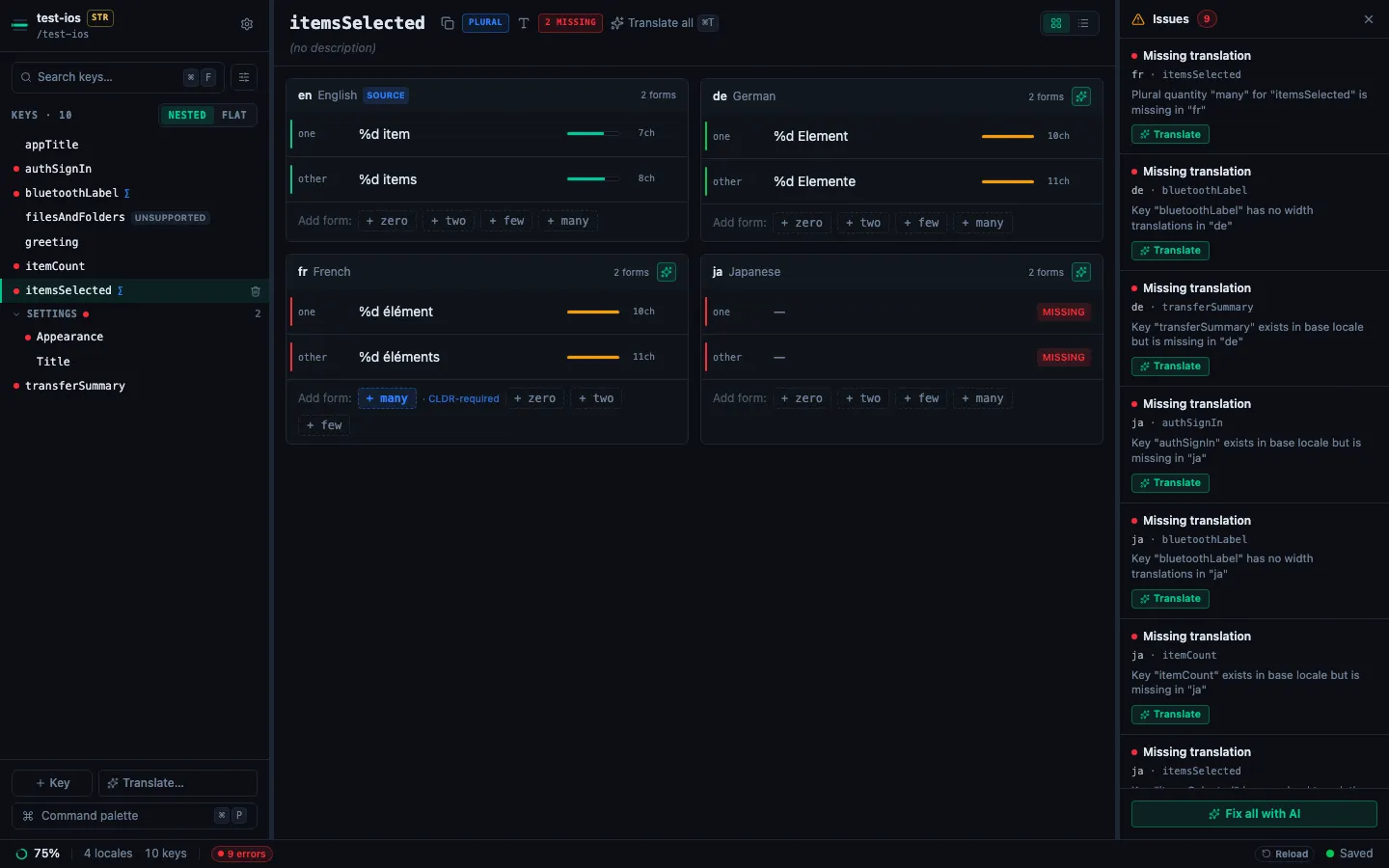
Plural keys appear in the detail pane as one panel per locale with a row per form, each with its
own validation rail and character-width bar. To turn an existing .strings key into a plural,
hover a non-empty cell and click its {} Format helper button, switch to the Plural
reference tab, and use Convert this key to plural (it appears only for keys that are not
plurals already).
Editing width entries#
A width-adaptive key announces itself. The panel shows a badge reading Selected by available width (NSStringVariableWidthRuleType), not by grammatical number, the form count reads "2 widths" rather than "2 forms", and the row labels are the numbers themselves.
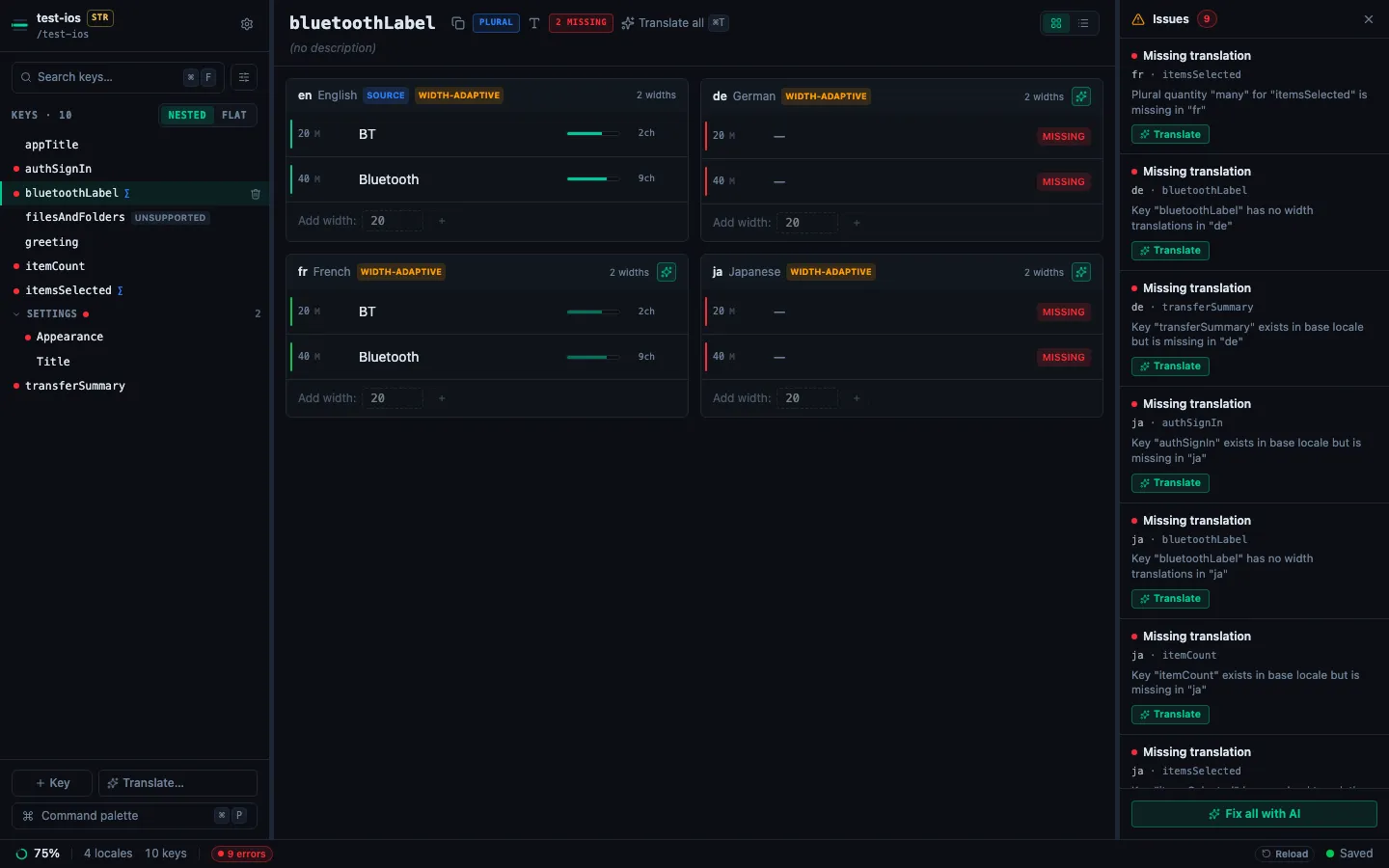
The CLDR chip row is replaced by an Add width: input. A width has to be a plain positive
integer (20, not 020, +20, or 2,0), because 020 and 20 are distinct plist keys but the
same number, and accepting both would let you create two rows iOS reads as one threshold. Reserved
names (NSStringFormatSpecTypeKey, NSStringFormatValueTypeKey) are rejected too: they live in
the same dictionary as the forms and would collide with the entry's own declarations. A width that
is already in your file is displayed and preserved whatever it looks like: the rule gates what
StringLane will write, not what it will read.
New widths are inserted in numeric order rather than appended, so adding 30 to an entry that has
20 and 40 puts it between them. If the existing widths are not in ascending order, that is your
arrangement, and the new one appends instead of imposing a sort on a file you did not ask to be
reordered.
AI translation is width-aware: the model is told the number is an M-width and not a quantity, told not to invent plural categories, and told that a form's translation must be no longer than the source for that same width, otherwise the string stops fitting the screen the entry exists to serve. Validation likewise raises no "missing plural category" issue against a width entry.
Editing device entries#
A device entry shows one row per device, each checked against the base language's string for the same device. Add device chips add a device the entry does not have yet. Translate all missing and the per-cell translate button fill each device's string without adding plural forms, and the entry is saved back in Apple's direct layout. A new language gets the same layout.
A language that holds variants under a .strings string#
Your base language can keep a key as one string in Localizable.strings while another language
holds it as plural forms, width variants or device variants in its .stringsdict. Foundation reads
the .stringsdict entry first, so those forms are that language's translation. StringLane checks
each form against the base string and counts it toward completion. The language's cell is locked
and the forms are shown read-only below it: edit them in Xcode. Translate all missing does not
offer the key, so nothing writes one string over them.
Multi-variable entries are read-only#
An entry declaring more than one format variable is shown but not editable. It is marked UNSUPPORTED in the key sidebar, and its detail pane reads StringLane can't edit entries with more than one format variable. Edit this one in Xcode., with the format string and every variable's forms rendered below it, so you can still read what is there.
An entry that holds both width and device variants, or a value that is not text, such as a nested
dictionary, is kept read-only the same way. Its detail pane reads This entry holds parts
StringLane can't edit, such as both width and device variants, or a value that is not text. Edit
this one in Xcode. stringlane check, plan and update skip it, and every save writes it back
with the same contents. An entry with only width variants or only device variants stays editable.
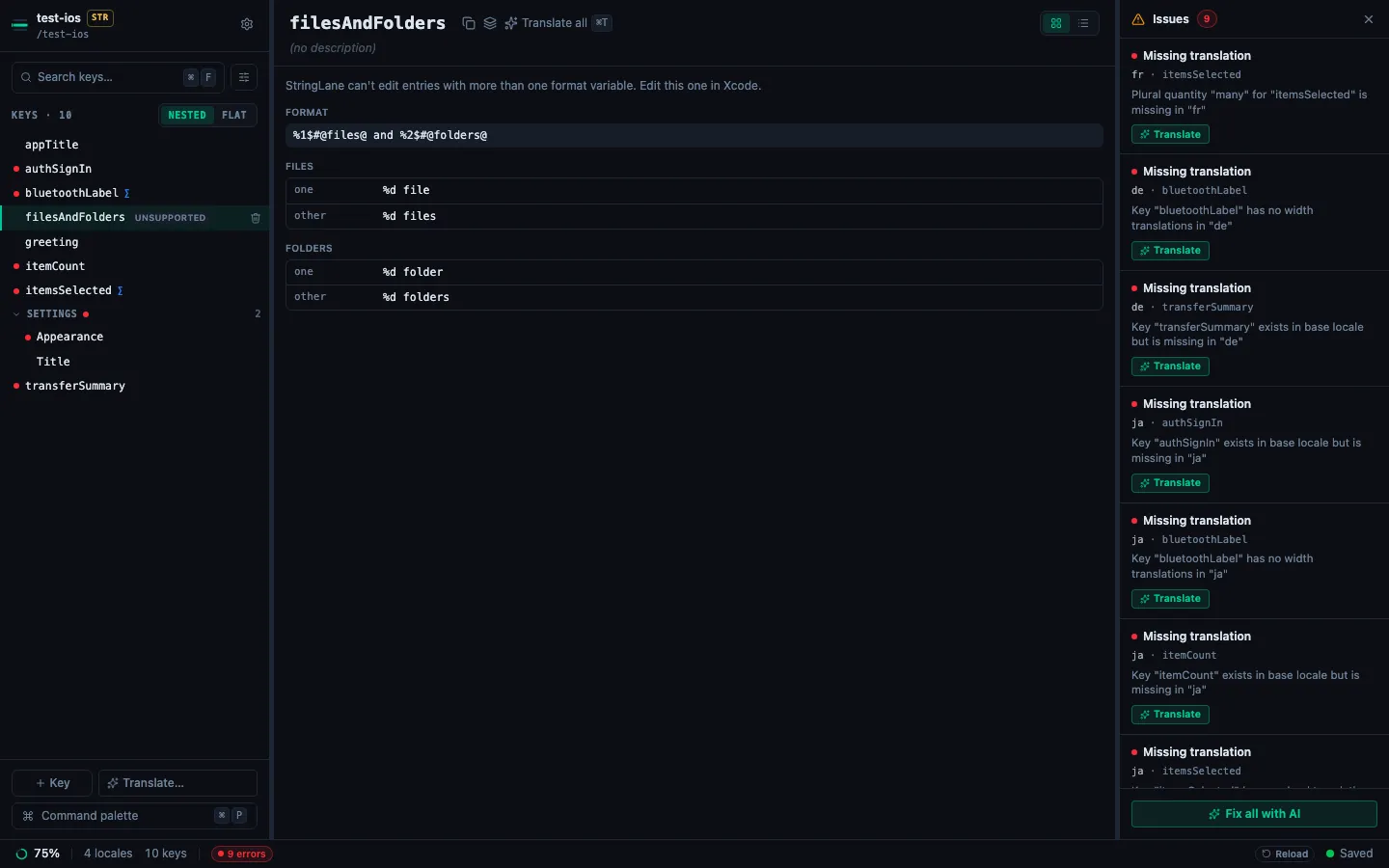
It is preserved exactly on save. The entry is transcribed whole when the file loads and written back from that record, so editing other keys in the same file never disturbs it.
A damaged .stringsdict is a load error#
A .stringsdict damaged by a git conflict or a cut-off write is reported as a load error that
names the file and says what to do: resolve the git conflict in it, or restore it from version
control. The Localizable.strings beside it still loads. StringLane does not write over the
damaged file: the app saves the .strings file and shows Refused to overwrite for that
language, and the CLI's apply and update write nothing to it.
What round-trips unchanged#
Saving a .stringsdict rebuilds the file, so anything StringLane does not record would be lost.
It records, per entry:
- the format variable's name: your
%#@itemCount@does not come back as%#@count@ - the literal text around the variable, so
%#@count@ selectedkeeps its trailing word - the value type, including its absence: an entry that declared none does not acquire one
- the rule type, so a width entry is never rewritten as a plural
- the order of keys inside each sub-dictionary, and the order of entries in the file
One rule overrides the recorded value: a width rule is never emitted above CLDR quantity forms. That pairing is not a valid entry in any circumstance (Xcode cannot read it), so preserving the declaration would mean writing you a broken file rather than preserving your file.
When the file gets written#
The companion is written only when the locale actually has plural or multi-variable content. Removing the last plural key is the exception that has to reach disk, or the key would return on the next load.
Before emptying a .stringsdict, StringLane re-reads it and re-parses it, and replaces it only if
it parses to content StringLane recognises. An empty in-memory map is also what an unreadable plist
produces, and a file whose only fault is that we do not understand it should not be destroyed on
that signal.
.stringsdict vs .xcstrings#
String Catalogs (.xcstrings, Xcode 15+) fold all of this into one
JSON file per string table, with plural and device variations expressed inline and a translation
state per string. There is no companion file to keep in sync.
If you are starting a new project, use String Catalogs. If you are on .strings and
.stringsdict, there is no urgency: Xcode still builds them, and plenty of shipping apps stay
there. StringLane edits both, and handles workspaces that mix the two mid-migration.
Next steps#
- iOS strings editor: what StringLane validates in a
.stringsproject. - How to Use the Format Editor: format-specific editing for iOS, Android, and i18next.
- Working with ICU Plurals and Select Forms: the ICU side, for ARB and i18next projects.
- How to Read Validation Badges: what each badge means.
Frequently asked questions
- What is a .stringsdict file for?
- A .strings file holds one string per key, so it cannot express "1 file" versus "3 files". The companion .stringsdict is an XML property list that stores the variants: one sub-dictionary per key, holding a form for each plural category the language needs. iOS picks the right one at runtime.
- What do the numbers 20 and 40 mean in a .stringsdict?
- They are device M-widths, used by entries whose rule type is NSStringVariableWidthRuleType. The number is roughly how many capital M glyphs fit in the space available, so one label can render BT on a narrow screen and Bluetooth where there is room. They are not quantities, and CLDR plural rules do not apply to them.
- Do I still need a .stringsdict if I use String Catalogs?
- No. A .xcstrings catalog expresses plural and device variations inline, so there is no separate file. .stringsdict is only needed for projects still on .strings, which Xcode continues to build.
- Can I put plurals directly in Localizable.strings instead?
- No. The .strings format is flat key-value pairs with no way to express variants, which is exactly why .stringsdict exists. The two files work as a pair: the key lives in .strings and its plural forms live in the .stringsdict beside it.
- What should NSStringFormatValueTypeKey be for a Swift Int?
- lld, with %lld in every form. Swift Int is 64-bit, and d reads only 32 bits of it: 5,000,000,001 prints as 705,032,705. Use d only for Int32.
- Why does my iOS app show %#@width@ instead of the text?
- The width variants are framed under a format variable: NSStringLocalizedFormatKey set to %#@width@, with the widths in a sub-dictionary. Apple's Foundation does not resolve that layout and returns the format string, and formatting it with a number can crash. Put NSStringVariableWidthRuleType directly under the key, as Apple documents. StringLane reports the framed layout as framed_width_variant.
- Why does my .stringsdict plural return (null)?
- A plural sub-dictionary with no NSStringFormatValueTypeKey is one cause. With the key removed, String.localizedStringWithFormat returned (null) for every count in our test on macOS. Add the key with the conversion your value needs, such as lld for a Swift Int.
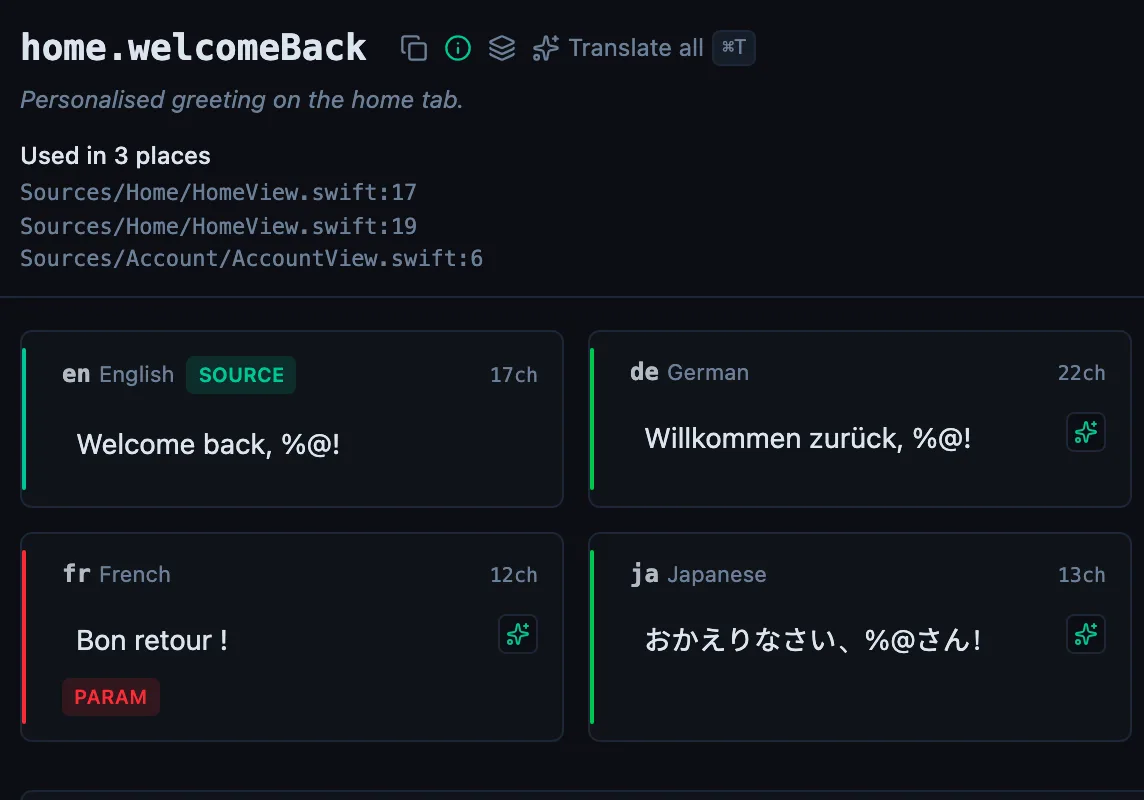
See every locale side by side
The desktop app flags what is missing or broken on the cell, and saves to your files.
14-day trial, no email