Flutter ARB File Format: Example, Placeholders, Plurals
An ARB file is the JSON file Flutter gen-l10n reads, one per locale. A complete example with placeholders, plurals, select and @ metadata, and what breaks.
Last updated
An ARB file (Application Resource Bundle) is a JSON file that holds every translatable string for one locale. Flutter's gen-l10n reads one ARB file per language, such as app_en.arb and app_uk.arb, and generates a typed AppLocalizations class your widgets call. Keys become Dart getters and methods, and @ metadata blocks declare each placeholder's type.
What does a Flutter ARB file look like?#
This lib/l10n/app_en.arb covers everything you will write in practice: a plain string, a typed placeholder, a plural, a select, a date and a number.
{
  "@@locale": "en",

  "appTitle": "Notes",
  "@appTitle": {
    "description": "App name shown in the title bar"
  },

  "greeting": "Hello, {name}!",
  "@greeting": {
    "description": "Greeting on the home screen",
    "placeholders": {
      "name": { "type": "String", "example": "Ada" }
    }
  },

  "fileCount": "{count, plural, =0 {No files} one {{count} file} other {{count} files}}",
  "@fileCount": {
    "description": "Number of files in a folder",
    "placeholders": {
      "count": { "type": "int" }
    }
  },

  "sharedBy": "{gender, select, female {She shared this} male {He shared this} other {They shared this}}",
  "@sharedBy": {
    "description": "Who shared the note",
    "placeholders": {
      "gender": { "type": "String" }
    }
  },

  "lastEdited": "Last edited {date}",
  "@lastEdited": {
    "placeholders": {
      "date": { "type": "DateTime", "format": "yMMMd" }
    }
  },

  "storageUsed": "{percent} of storage used",
  "@storageUsed": {
    "placeholders": {
      "percent": { "type": "double", "format": "percentPattern" }
    }
  }
}
Running flutter gen-l10n on it generates these signatures:
String get appTitle;
String greeting(String name);
String fileCount(int count);
String sharedBy(String gender);
String lastEdited(DateTime date);
String storageUsed(double percent);
Three conventions are at work:
@@localeis a file-level attribute naming the language the file holds.- Translation keys such as
greetingandfileCountbecome the getters and methods above. They must be valid Dart method names, sofile-countstops the build. @keymetadata such as@greetingdescribes the key of the same name: adescriptionfor translators, andplaceholderswith their types. See ARB metadata fields for the rest.
What does a translated ARB file contain?#
Only the template file needs the @ blocks. A translation carries the values, and the plural carries the categories its own language needs. Here is app_uk.arb:
{
  "@@locale": "uk",
  "appTitle": "Нотатки",
  "greeting": "Привіт, {name}!",
  "fileCount": "{count, plural, =0 {Немає файлів} one {{count} файл} few {{count} файли} many {{count} файлів} other {{count} файлу}}",
  "sharedBy": "{gender, select, female {Вона поділилася цим} male {Він поділився цим} other {Поділилися цим}}",
  "lastEdited": "Востаннє змінено {date}",
  "storageUsed": "Використано {percent} сховища"
}
English needs one and other; Ukrainian needs one, few, many and other. A Ukrainian translation that copies English's two branches still builds, and renders "3 файлів" where Ukrainian says "3 файли".
How do placeholders work in an ARB file?#
Write the placeholder in the value as {name} and declare it in the @key block with a Dart type. The type sets the generated parameter: "type": "DateTime" produces lastEdited(DateTime date). DateTime and numeric placeholders also take a format, which picks an intl pattern such as yMMMd or percentPattern.
An undeclared placeholder still compiles. gen-l10n infers num inside a plural, String inside a select, DateTime in a date expression, and Object for a plain {name}. A declared type has to fit its use: a plural placeholder declared as String stops the build with Placeholders used in plurals must be of type 'num' or 'int'.
Placeholders are matched by name, so a translator can move {name} anywhere in the sentence. Matching by name also means two mistakes compile without a word:
- A translation drops a placeholder.
"greeting": "Bonjour !"builds, and French users see a greeting without the name. - A translation adds one.
"greeting": "Hallo {name}, {extra}!"makesgen-l10naddObject extratogreeting()in every locale, so every existing call site stops compiling, in a file you did not touch.
Fix placeholder mismatches covers finding both across every locale.
How do plurals work in an ARB file?#
ARB values use ICU MessageFormat, so a plural lives inline in the string:
"fileCount": "{count, plural, =0 {No files} one {{count} file} other {{count} files}}"=0is an exact match, checked before the categories.gen-l10nbuilds only=0,=1and=2as exact matches: any other, such as=3, fails the whole file. A plural holding both=1andone(or=0andzero,=2andtwo) is read as one form, and the later branch wins.one,few,many,otherare CLDR plural categories, and each language needs its own set.otheris required. A plural without it stops the build withPlural expressions must have an "other" case.
Apostrophes are plain text. gen-l10n reads ' as an ordinary character unless l10n.yaml sets use-escaping: true, so {name} in Remove '{name}' from your profile? is still a placeholder, with quote marks around it.
Do not use # in an ARB plural. Most ICU runtimes replace # with the number, but gen-l10n does not, and the generated code keeps '# files' as a literal string. Write {count} in every branch.
How does select work in an ARB file?#
select picks a branch by a String value you pass in, most often grammatical gender:
"sharedBy": "{gender, select, female {She shared this} male {He shared this} other {They shared this}}"The branch names are yours to choose, and other is required here too. The placeholder must be a String; declaring it as int stops the build with Placeholders used in selects must be of type 'String'.
Where does Flutter look for ARB files?#
gen-l10n reads its settings from l10n.yaml at the project root:
arb-dir: lib/l10n
template-arb-file: app_en.arb
output-localization-file: app_localizations.dart
The template file defines the API: its keys and @ metadata decide which methods exist. Every other file supplies values for the same keys. The locale comes from @@locale or the file name, and the two must agree. A regional file such as app_pt_BR.arb needs a plain app_pt.arb beside it as the fallback, or the build stops.
What breaks an ARB file without failing the build?#
Syntax errors stop flutter gen-l10n with a message pointing at the file and key; Flutter gen-l10n errors lists each one with its fix. The failures that matter are the ones that build:
- A missing translation.
gen-l10nprints"de": 1 untranslated message(s)and generates the code. The string falls back to the template locale and ships in English. - A dropped or added placeholder, as above.
- A plural with English's categories in a language that needs more.
- A
#in a plural branch, shown literally instead of the number. - A
selectbranch missing from a translation, which silently falls back toother. - A plural with both
=1andone, whose earlier branch is never shown.
None of these fail the build, and most are in a language you may not read.
How do you check ARB files across every locale?#
StringLane reads every app_*.arb file in the project and checks each locale against the template: missing keys, dropped or extra placeholders, invalid ICU, missing plural categories, exact plural matches gen-l10n cannot build and branches a =1 and one pair hides, missing select branches, # in plurals, and keys only a translation holds. The free CLI runs the checks from a terminal or CI and writes nothing into your repository:
npx @stringlane/cli@latest check .The ARB editor shows the same checks while you edit, with every locale side by side for each key, and writes back to the same files flutter gen-l10n reads.
Next steps#
- Localize Your Flutter App End to End: the full ARB workflow, from setup to
flutter gen-l10n. - ARB metadata fields: what
description,x-max-lengthandx-guardeddo. - What Is ICU MessageFormat?: plural categories,
select, and where the syntax breaks. - Inspect and Check a Project: run the checks in CI.
Frequently asked questions
- What is an ARB file?
- An ARB (Application Resource Bundle) file is a JSON file holding every translatable string for one locale. Flutter's gen-l10n reads the set of them, such as app_en.arb and app_uk.arb, and generates a typed AppLocalizations class your widgets call.
- How do placeholders work in a Flutter ARB file?
- Write the placeholder in the value as {name} and declare it in the matching @key block with a Dart type such as String, int, double or DateTime. An undeclared placeholder still compiles: gen-l10n infers num inside a plural, String inside a select, DateTime in a date expression, and Object everywhere else.
- What happens if a translation drops or adds a placeholder?
- Neither stops the build. A translation that drops {name} compiles and shows the sentence without the value. A translation that adds a placeholder the template does not have makes gen-l10n add that parameter to the method for every locale, so existing call sites stop compiling.
- Why does # render literally in my Flutter app?
- Flutter's gen-l10n does not implement the ICU pound token. Most ICU runtimes replace # with the number; the code Flutter generates keeps it as a literal #. Write the plural variable instead, {count} rather than #, in every branch.
- Does a missing translation fail the Flutter build?
- No. gen-l10n prints a count such as "de": 1 untranslated message(s) and generates the code anyway. The missing string falls back to the template locale, so it ships in English.
- What is the difference between ARB and JSON?
- ARB is JSON with conventions on top. Keys starting with @@ are file-level attributes such as @@locale; a key starting with a single @ is metadata for the translation key of the same name. Every ARB file is valid JSON, but not every JSON file is valid ARB.
- What file name does Flutter expect?
- By default gen-l10n reads app_<locale>.arb from lib/l10n, for example app_en.arb or app_pt_BR.arb. The directory and the template file are set in l10n.yaml with arb-dir and template-arb-file. A regional file such as app_pt_BR.arb also needs a plain app_pt.arb as its fallback.
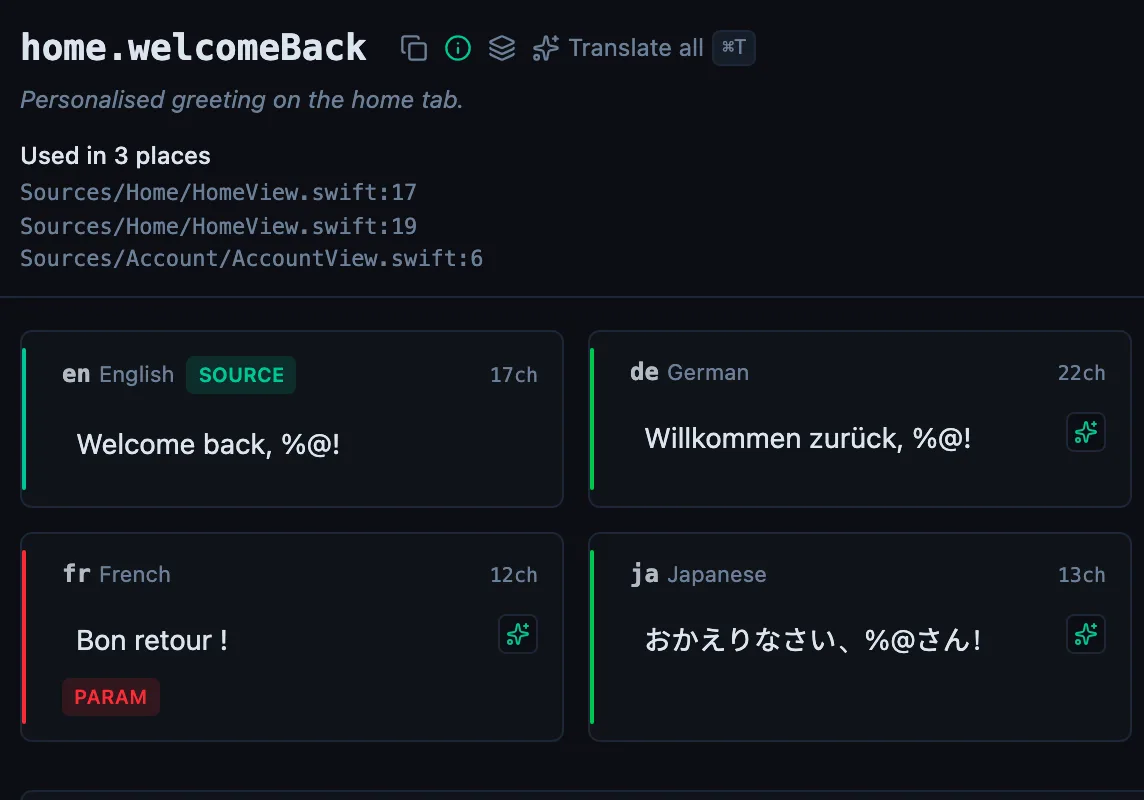
See every locale side by side
The desktop app flags what is missing or broken on the cell, and saves to your files.
14-day trial, no email