XCODE STRING CATALOGS · macOS, WINDOWS, LINUX
An .xcstrings editor that keeps translation state honest
StringLane opens Localizable.xcstrings outside Xcode, shows every language side by side, and updates each string's state when you edit so the catalog does not drift out of sync with reality.
For macOS, Windows and Linux14-day trial, no email · $49 once

Every issue listed with its fix
THE FORMAT
What StringLane opens
A String Catalog is one JSON file per string table holding every locale, plus a translation state for each string in each language. That state is the feature, and it is also the thing hand-editing the JSON gets wrong: change a value in a text editor and the surrounding state does not move, so Xcode's view of what still needs translating quietly stops being true.
- File layout
- One
Localizable.xcstringsper string table, all locales inside it - Placeholders
%@,%d,%lld, and positional forms such as%2$@- Plurals
- Apple variations, stored inline in the catalog
- Per-string state
new,needs_review,translated- Detected by
- Any
.xcstringsfile, including several across sibling targets - Project chip
XCS
WHAT GETS FLAGGED
What gets flagged in a String Catalog
Validation runs when the catalog loads and again after every edit. These are the checks that apply to .xcstrings. The same checks run from the terminal with stringlane check, and over MCP for a coding agent.
Missing or empty per language
The string exists in your source language and is absent or blank in another. In a catalog with thirty languages this is the number you cannot hold in your head, which is the entire reason for the side-by-side view. A key with no English entry, because the key itself is the English text, counts as English in every language. A string Xcode marks Stale owes no translation.
missing_keyFormat specifier mismatch
Specifiers are compared by count and by the type each argument is read as, rather than by name. If the source has
%@and%lldand the German translation came back with one specifier, or with%@where the source reads a number, that is an error, and it is the class of mistake bulk AI translation produces most often.%ldand%lldread the same type;%dand%lddo not.format_placeholder_mismatchPlural coverage against CLDR
Each language is checked against the plural categories it actually requires. Ukrainian needs
one,few,manyandother. English needs two. Supply only the English pair and the missing categories are flagged, which you can verify without reading the language. A language that varies a string by plural on its own, while English keeps one string, is checked form by form, with each form’s specifiers compared to the English text.missing_keySame as source, and guarded words
A value identical to the source language usually means it was copied and never translated. Terms you mark as guarded, such as your app name, are flagged when a locale changes them instead.
untranslatedguarded_word_violation
What it will not do
ICU MessageFormat validation does not apply here, and StringLane does not pretend otherwise. String Catalogs express plurals as Apple variations, not as ICU strings, so the ICU checks you would get on an ARB or i18next project are switched off for this format. Plural coverage is still checked, through CLDR.
YOUR FILES
The catalog stays canonical
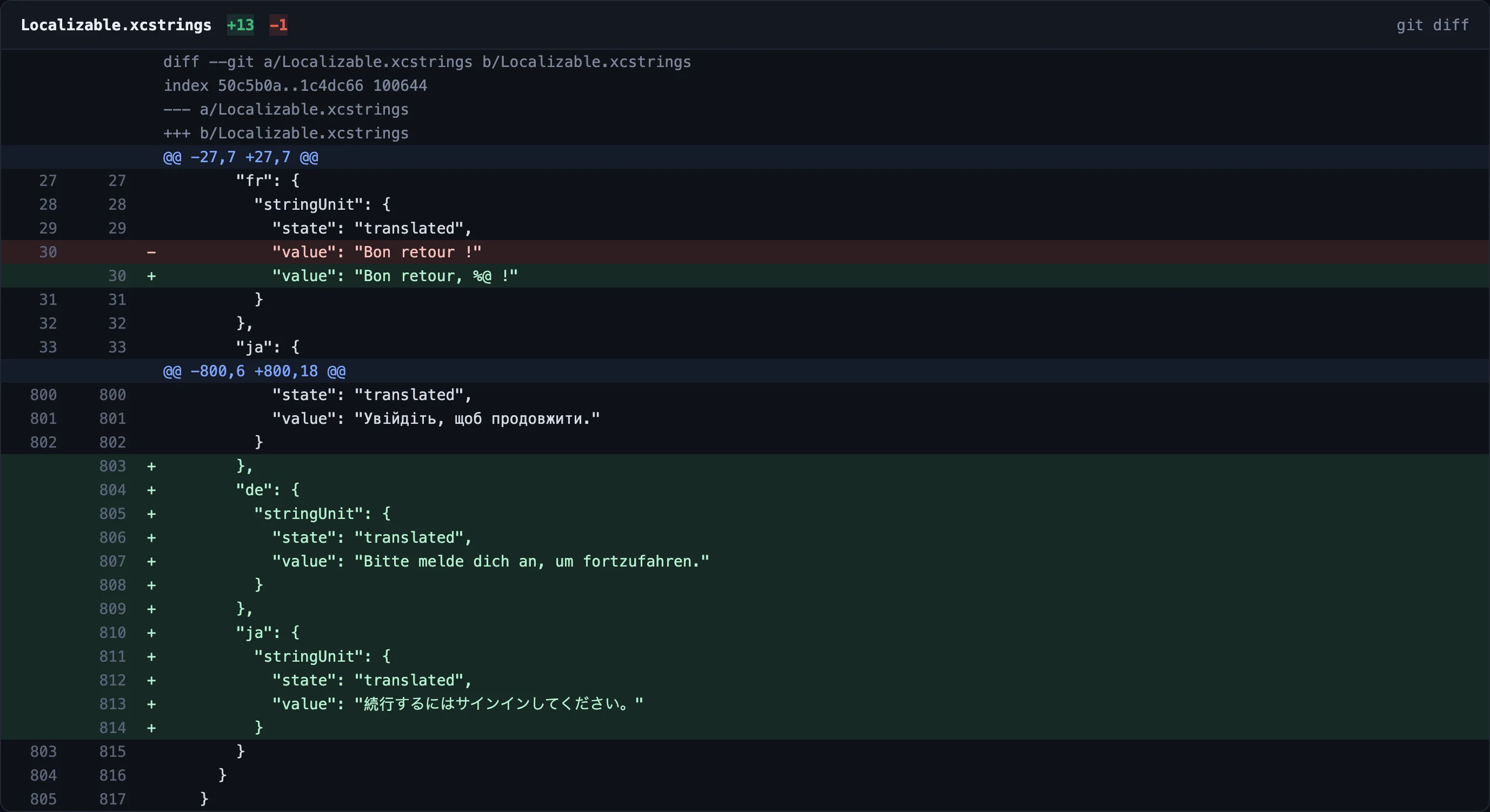
StringLane writes to the same .xcstrings file Xcode reads. There is no export step and no second copy of your strings.
- Translation state is updated for you: a value you fill becomes
translated, one you clear reverts tonew. - Strings marked
shouldTranslate: falseare left alone, including their state. - Adding a language merges into the existing file rather than creating a second one.
YOUR TOOLCHAIN
Where it sits in an Xcode project
Xcode still owns extraction. It pulls string literals out of your code into the catalog at build time, exactly as before, and StringLane never touches your .xcodeproj or .xcworkspace. What it changes is the editing surface: instead of one language at a time in the Xcode inspector, every language is a column.
This is also why StringLane runs on Windows and Linux. The catalog is JSON, not a Mac-only bundle, so a cross-platform team can work on the same iOS strings without an Apple machine each.
Let your coding agent check the same files.
The free CLI reads the same Localizable.xcstrings, so your coding agent and CI get these checks too.
Read https://stringlane.app/docs/cli/agent-setup.md and set up StringLane for this project.Pay once for the app. The CLI is free.
Desktop app
$49once
- 14-day trial, no email, no card
- macOS, Windows and Linux
- 3 machines, updates in the major version
- Your own AI key, or a local model
Early-adopter price, $79 after launch.
CLI & agents
$0free
- Terminal, CI and MCP
- Claude Code, Cursor, Codex and 5 more
- No key, no activation
- Separate from the app licence
Lokalise starts at $144 a month (checked July 2026). StringLane sells no AI credits.
Xcode String Catalog questions
Do I still need Xcode?
What happens to translation state when I edit a value?
translated for that language, and clearing a value returns it to new. This is the main reason to use an editor that understands the format rather than opening the JSON in a text editor, where the state silently stays wrong.Does it touch strings marked shouldTranslate: false?
My project is mid-migration and still has .lproj folders. Does that work?
.lproj cluster and every .xcstrings file, and loads them as one project with keys namespaced by their origin folder. Saves go back to each origin in its own native format, so a half-migrated project keeps working.Can I add a new language?
fr or zh-Hans. The language merges into the existing catalog file, and every string that needs translating shows as missing for that language until you fill it manually or with AI. Strings marked not for translation, and strings Xcode marks Stale, are left out.Read before you download
What is the .xcstrings format?
String Catalogs explained, including the per-string state model.
Opening an Xcode project
How multi-target workspaces and mixed-format projects load.
Reading validation badges
What each badge means and how to clear it.
Adding a language
Presets, and what happens to the catalog on save.
Key descriptions and limits
Editing a string
commentandshouldTranslatewithout opening Xcode.
If your project has not migrated to String Catalogs, or has targets that never will, the .strings page covers .lproj folders and companion .stringsdict plural files.
Check your locales tonight.
For macOS, Windows and Linux14-day trial, no email · The agent setup is free